

Position Analysis of a 4 Bar RRRP Non Grashofian Slider Rocker Mechanism

Schematic Diagram of a 4 Bar RRRP Linkage
The 4 bar RRRP mechanism is another basic mechanism in studies on kinematics. It is also widely used in various forms because of the relative simplicity of design and manufacture. Like RRRR linkages, Grashof's criteria is used to distinguish between 4 bar linkages with one prismatic joint, depending on the rotatability of the links In brief, if l is the shorter of the crank and the coupler and L the longer of the two, and e is the offset, then the following cases arise
- l + e < L : Grashofian linkage
- l + e < L, shortest link s is the ground link. : Inverted Slider Crank (RRPR)
- l + e < L , shortest link is the coupler : Inverted Slider Rocker (RRPR)
- l + e < L , shortest link is crank : Slider Crank (RRRP)
- l + e < L , shortest link is coupler : Slider Rocker (RRRP)
- l + e > L : Non Grashofian linkage
For a more detailed introduction to Grashof criteria for linkages with one prismatic joint see the animated guide that follows. If undisturbed , the animation will proceed at a predetermined pace. You can either click on the animation itself to move from step to step as per your convenience. Alternatively you can use the controls at the bottom of the animation to see it at your own pace.
In a Non Grashofian Slider Rocker the input link (link 2) CANNOT rotate through a full circle.Like the slider, there exists limits on the range of motion for the input link (link 2) as well. However unlike the Grashofian slider rocker, here there are no two distinct modes of motion. In a Grashofian slider rocker, depending on the mode of assembly, the same set of links will trace a different coupler curve for each of the two modes. But a Non Grashofian slider rocker, irrespective of mode of assembly will trace the same coupler curve. Check the Demo tab to see the comparison.

|
Grashofian Slider Rocker |
Non Grashofian Slider Rocker |
Animations of a Grashofian and Non Grashofian Slider Rocker
- Clicking on the buttons will rotate the crank in the directions indicated. The slider can be used for controlled rotation.
- The view can be rotated about a point by keeping the left mouse button pressed and rotating the mouse.
- The view can be translated by keeping the right mouse button pressed and translating the mouse in the desired direction
- The scroll button or middle mouse button can be used for zooming.
- The view can be rotated about the coordinate axes by using the left (<--) and right (-->) keys and the Page Up and Page Down keys on the keyboard.
- Using the Up Arrow and Down Arrow keys will move the view towards or away from the viewer.
- The - and + (or Shift + =) keys may be used for zooming out and zooming in.
- Pressing the = key will get the view back to default.

In this experiment you will guided through the position analysis of a 4 bar RRRP Non Grashofian Slider Rocker. Position analysis can be approached analytically. Using complex numbers is a popular analytical approach. The animated guide that follows right next shows the analytical method of determining the position of a point on the coupler of a RRRR linkage as the linkage moves. The next animation shows the graphical constructions needed for the position analysis of a double crank linkage. A summary of what you are expected to do follows. This is followed by stwo animated guides for finding out the two extreme configurations for the slider, because in a slider crank, while the input link (link 2 - crank) does rotate through a full circle, the slider has limits on its displacement. There are thus two extreme positions of the slider and the corresponding crank angles that you are expected to find out using these guides.
- In the Instruments tab use the first applet to choose a set of 4 link lengths. Enter your choices for link lengths. The apllet will let you know if the lengths conform to a Non Grashofian Slider Rocker. If your link lenths are improper go back to the Introduction tab and check the Grashofs criteria for Non Grashofian Slider Rocker and modify link lengths accordingly.
- Use the Drawing Board applet in the Instruments tab to find the linkage configuration for a given input link orientation (theta 2).
- Finally there is a third applet in the Instruments tab which lets you verify your results. Enter your answers to see the correct values for coupler position and the accuracy of your answers obtained graphically.
The following are animated guides for analytical and graphical methods of position analysis for a 4 bar Non Grashofian RRRP Slider Rocker.

Choose link lengths, preferably keeping them within 10 units length for easy viewing of animations. Enter them and a coupler arm length and orientation of your choice in the following applet in the designated text boxes. Link 1 represents the ground link. Press the Enter button to verify if your data conforms to a Grashofian Crank Rocker. Note that coupler arm length and orientation play no role in Grashof's criteria, but you are merely asked to enter them for use in later stages. In case you get a message stating that your data does not conform to a Grashofian Crank Rocker,
Once your link lengths are validated, you are expected to find out graphically the limiting positions of the crank rocker using the Drawing Board Applet which will open when you click the link below. A new browser window will open along with the applet. Since the linkage is a crank rocker, therefore the follower link will rotate between two limits of theta 4. You are required to find those limits using this applet. The applet uses screen coordinates for drawing. Hence if you are using link lengths between 1 to 10 units it is advisable (although zoom is available for the applet) to choose a scale between 100:1 to 10:1 for easy on screen use.
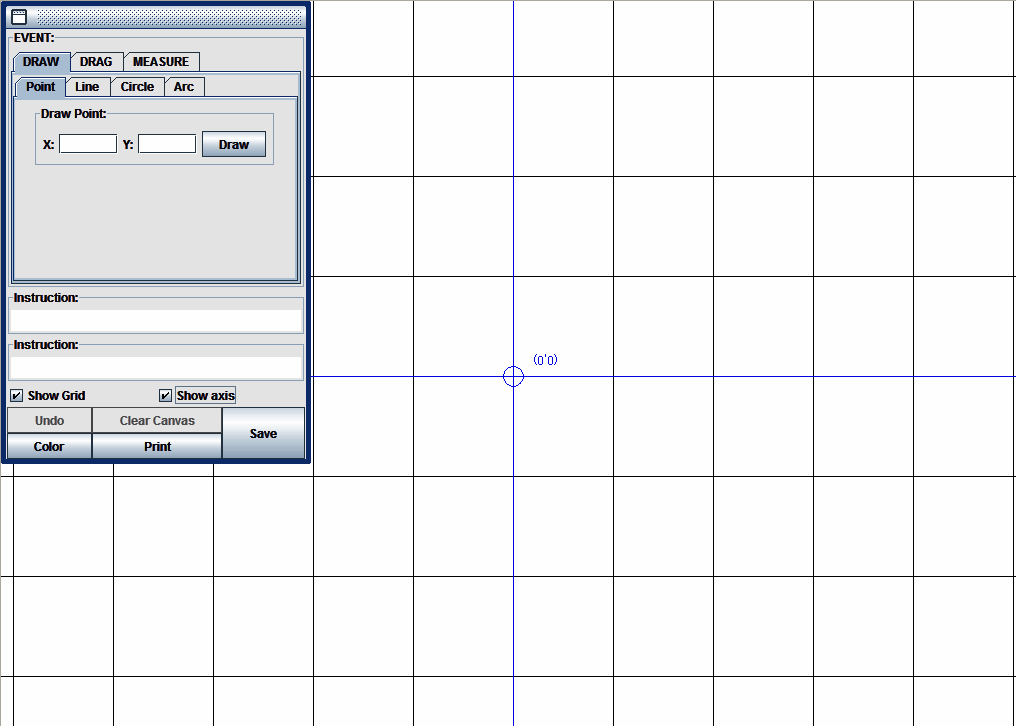
To get an animated guidance of the graphical analysis using the applet clink below
How to use the Drawing Board to find limit positions of the Crank Rocker graphically
Validate your answer using the applet below

The simulator applet allows you to assemble your RRRP mechanism and run it. Click on the image below. A new browser window or tab will open with the applet. The applet is very similar to the animation in the Demo Tab and the instructions for using it apply to this applet as well. Perform the following tasks using the simulator. Use the mouse to drag the I/O Control Palette to any convenient location.
- Click on the Input Data tab. Provide the link details i the designated text boxes that appear under this tab. Click on the Update Button.
- Click on the Output Control tab. Use the slider labeled Theta 2 in the menu provided to rotate the crank. Obtain the complete coupler curve. The output data will be displayed in the Slider Panel in the designated text boxes. Run the mechanism through its full range of theta2. Compare the mechanism configuration with that obtained through graphical analysis to validate your results.
- Click the Toggle Assembly Mode button to run the mechanism in the two feasible assembly modes
- Drive the mechanism by rotating the coupler in place of the crank by using the slider labeled Theta3. Run in both the assembly modes by clicking the Toggle Assembly Mode button.


- A. K. Mallik, A. Ghosh and G. Dittrich - Kinematic Analysis and Synthesis of Mechanisms, CRC Press Inc. Boca Rato
- A. Ghosh and A. K. Mallik - Theory of Mechanisms and Machines, Affiliated East-West Press (P) Ltd., New Delhi
- Kenneth J. Waldron, Gary L. Kinzel - Kinematics, Dynamics And Design Of Machinery, Wiley India Pvt Ltd
- John Joseph Uicker, G. R. Pennock, Joseph Edward Shigley - Theory of machines and mechanisms , Oxford University Press
- Arthur G. Erdman, George N. Sandor, Sridhar Kota - Mechanism Design: Analysis And Synthesis, Prentice Hall
- Atmaram H. Soni -Mechanism Synthesis and Analysis,, McGraw-Hill Inc.,US